Microsoft Defender for Cloud Apps: Deployment Guide · CloudEngineerHub
Defender11 min read4 views
Microsoft Defender for Cloud Apps: Deployment Guide
Deploy Microsoft Defender for Cloud Apps in phases: shadow IT discovery, app connectors, OAuth governance, and Conditional Access App Control for sanctioned SaaS.
C
CloudEngineerHub Team
Published: August 8, 2026· Last Updated: September 24, 2026·11 min read
Microsoft Defender for Cloud Apps: Deployment Guide
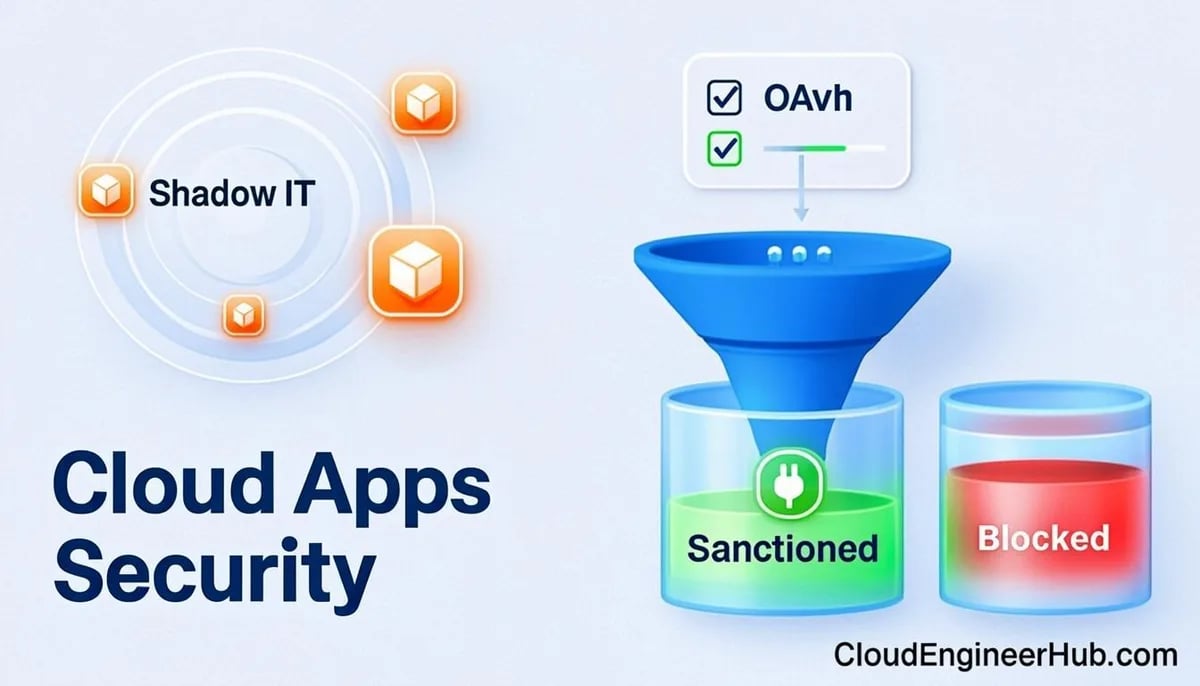
Ask a CISO how many cloud apps their company uses and they will guess forty. The discovery dashboard usually says four hundred. Microsoft Defender for Cloud Apps (MDCA) is Microsoft's CASB — it finds that shadow estate, connects to the apps you sanction, watches OAuth apps for abuse, and puts a policy enforcement point between users and SaaS through Conditional Access App Control.
Visual Walkthrough
What Defender for Office does to every URL and attachment before the click.
Exchange Online Protection filters at the perimeter.
rewrite
2
URL rewritten
Safe Links wraps URLs; the click becomes a policy decision.
detonate
3
Attachment detonated
Safe Attachments runs files in a sandboxed VM.
verdict
4
Verdict applied
Clean delivers; malicious quarantines with user nudge.
click time
5
Click-time check
At click, reputation re-checked — zero-hour protection.
6
Telemetry to SOC
Campaign views + Explorer feed threat hunting.
Safe Links & Safe Attachments — Message Journey. 1. Mail arrives at EOP: Exchange Online Protection filters at the perimeter. — 2. URL rewritten: Safe Links wraps URLs; the click becomes a policy decision. — 3. Attachment detonated: Safe Attachments runs files in a sandboxed VM. — 4. Verdict applied: Clean delivers; malicious quarantines with user nudge. — 5. Click-time check: At click, reputation re-checked — zero-hour protection. — 6. Telemetry to SOC: Campaign views + Explorer feed threat hunting.
C
CloudEngineerHub Team
Author
The CloudEngineerHub editorial team — Microsoft endpoint management and cloud engineers writing hands-on guides on Intune, Azure, Entra ID, Autopilot, Defender and PowerShell. Every article is reviewed against current Microsoft documentation.
This guide walks the deployment in the order that produces value fastest: discovery first, investigation second, enforcement last. Reversing that order is how projects stall — you cannot write policies for apps you have not inventoried.
Prerequisites
Licensing: Microsoft 365 E5 or E5 Security add-on, or a standalone Microsoft Defender for Cloud Apps license, for the users you will govern.
Roles: Security Administrator to configure MDCA and Conditional Access; Global Reader or Security Reader for reporting.
Defender for Endpoint (recommended): onboarded devices enable rich, proxy-free discovery.
Network path: if you use log-based discovery instead of EDR integration, a firewall/proxy supporting the MDCA log formats (Check Point, Palo Alto, Zscaler, Fortinet, and others) or the MDCA log collector.
Conditional Access in use, because App Control is delivered through CA session policies.
How It Works
MDCA provides four CASB functions:
Cloud Discovery — analyzes traffic logs or Defender for Endpoint network signals to build an inventory of apps in use, scored 1-10 against 90+ risk factors (certification, data residency, encryption, terms of service). Discovered apps are then sanctioned or unsanctioned.
Information protection — discovers, classifies, and (optionally) applies sensitivity labels to files in connected SaaS storage, and flags exposure (publicly shared files with confidential labels).
Threat protection — behavioral analytics and UEBA (impossible travel, activity from infrequent countries, mass downloads, suspicious inbox forwarding) plus configurable activity and file policies with automated governance actions.
App governance / OAuth — inventories the third-party apps holding consent in your tenant and their permission scopes, flags over-privileged or high-volume OAuth apps, and can disable them.
Data flows into the unified Defender XDR portal (security.microsoft.com, Cloud Apps section). API app connectors pull activity, files, and admin actions from SaaS platforms — Office 365 and Azure are connected by default; Salesforce, Box, ServiceNow, Workday, Slack, Zoom, Google Workspace, and AWS are common additions. Conditional Access App Control routes sanctioned app sessions through MDCA as a reverse proxy, enabling monitor-only, block-download, block-upload, and label-protection session policies — including for apps you configure as custom apps.
Step-by-Step Implementation
1. Enable discovery
Start with Microsoft Defender for Endpoint integration: in the Defender portal, enable "rich reporting" from MDE signals — onboarded Windows devices then report app usage without any network gear. If devices are not fully onboarded, additionally deploy a continuous report from your firewall/proxy via the MDCA log collector. Within days the Cloud Discovery dashboard shows apps, users, data volume, and risk scores.
2. Triage and sanction
Review the top apps by users and data volume. Mark legitimate business apps as sanctioned; mark the clearly unacceptable as unsanctioned (you can later block them at the firewall from the MDCA recommendation, or via CA). Resist over-blocking in week one — discovery reports plus a governance process beat a firewall war.
3. Connect your SaaS estate
Add app connectors for the sanctioned platforms (Salesforce, Box, Workday, and so on) using admin credentials or OAuth consent as each platform requires. Connectors go read-only first; enable governance actions per connector once policies are tuned. Verify the Office 365 connector is active — it feeds mailbox-rule and file-share detection into your M365 investigation story.
4. Enable baseline anomaly detection
MDCA's built-in anomaly detection policies are on by default: impossible travel, infrequent country, suspicious inbox rules (for connected mail platforms), multiple failed logins. Tune the sensitivity and scope per user groups, and route alerts into your incident process (they appear in the unified Defender XDR alert queue and Microsoft Sentinel if connected).
5. Pilot Conditional Access App Control
Pick one high-value app (Salesforce is the classic pilot). In Entra Conditional Access, create a session policy targeting that app's users with "Use Conditional Access App Control" set to monitor-only. Confirm sessions appear in MDCA's App Control activity log. Then layer enforcement gradually: block download on unmanaged devices, protect files with sensitivity labels on download, block uploads of malware-flagged files.
6. Govern OAuth apps
Review the OAuth apps page: sort by permission level and recent activity. Revoke over-privileged apps nobody recognizes, and create app policies (for example, alert when an app with mail-read scope exceeds a user threshold). This is where real supply-chain risk hides — the OAuth grant users clicked three years ago.
Configuration Deep Dive
Discovery accuracy. Log-based discovery sees only egress traffic the firewall sees; EDR-based discovery sees per-user, per-device usage. Run both during the pilot and compare — gaps usually mean unmanaged devices or VPN patterns, which is itself a finding.
Custom apps for App Control. App Control works out of the box for cataloged apps; anything else can be onboarded as a custom (line-of-business) app by collecting domain and SSO metadata. Keep the custom app list short — each entry adds maintenance.
Session policy sequencing. Monitor-only for two weeks; then "block download" for unmanaged devices only (managed devices keep full access); then label protection (apply encryption on download of labeled files) for BYOD. Block-upload policies come last — they break workflows fastest.
File policies. Combine sensitivity labels with exposure checks: "files with label Confidential shared via public link" is the highest-signal file policy in most tenants. Governance actions can quarantine or remove the share link — test the quarantine workflow with the data owners first.
UEBA baselines. Anomaly detection needs about two weeks of history to build user baselines; do not judge alert quality on day three. Scope detection to the user groups that matter (privileged users, finance, executives) to keep noise down.
Real-World Enterprise Scenario
A 4,000-user professional services firm ran MDCA discovery for 30 days and found 612 distinct cloud services — including three AI chatbots receiving confidential contract text, and a file-sharing site used by a whole project team as a "temporary" SharePoint replacement.
The security team sanctioned the 40 apps with active business cases, connected Salesforce and Workday via API, and piloted App Control on Salesforce with monitor-only for two weeks. They then enforced block-download for unmanaged devices and label protection on confidential files. The unsanctioned AI services went through the app governance process instead of an instant block — two were replaced with the enterprise AI platform, one was genuinely needed and went through security review. The OAuth review revoked 11 apps with high-risk scopes, one of which had read access to 2,000 mailboxes. Total enforcement actions after 60 days: modest. Visibility gained: total.
PowerShell for Cloud App Security
Graph's security API surfaces MDCA-generated alerts and your secure score, enabling scripted reporting:
PowerShell
1
2
3
4
5
6
7
8
# Read Defender alerts (including MDCA anomaly and policy alerts)
Connect-MgGraph -Scopes"SecurityAlert.Read.All"# Latest 10 alerts from the unified queue$alerts = Invoke-MgGraphRequest -Method GET -Uri `
'https://graph.microsoft.com/v1.0/security/alerts_v2?$top=10'$alerts.value | Select-Object id, title, severity, status, createdDateTime | Format-Table
# Expected output: alert list where serviceSource shows the generating product (e.g. cloudAppSecurity)
Track the security-relevant configuration trend that MDCA contributes to:
PowerShell
1
2
3
4
5
6
7
8
9
Connect-MgGraph -Scopes"SecurityEvents.Read.All"# Latest secure score with its control breakdown$score = Invoke-MgGraphRequest -Method GET -Uri `
'https://graph.microsoft.com/v1.0/security/secureScores?$top=1'$score.value[0].controlScores |
Where-Object { $_.controlName -match'Apps|Data' } |
Select-Object controlName, score, scoreInPercentage | Format-Table
# Expected output: score rows for app/data-related controls to baseline before and after rollout
Both queries drop straight into a weekly SOC report — before/after numbers are how you prove the deployment paid for itself.
Visual Walkthrough
The four implementation pillars mapped to concrete M365 controls.
Interactive FlowZero Trust in Microsoft 365 — Verify Explicitly6/6
Zero Trust in Microsoft 365 — Verify Explicitly. 1. Verify identity: Phishing-resistant MFA + risk-based Conditional Access. — 2. Verify device: Intune compliance + EDR health required for access. — 3. Least privilege: PIM, RBAC scopes, entitlement management for access. — 4. Assume breach: Micro-segmentation, DLP, least-standalone controls limit blast radius. — 5. Encrypt end-to-end: TLS everywhere + sensitivity labels on the payload. — 6. Telemetry loop: Logs feed detection → response → policy refinement.
Troubleshooting
Symptom
Likely cause
Fix
Discovery dashboard empty
No log source connected or MDE integration off
Enable E2E integration; deploy log collector; verify firewall log format
App Control session not proxied
CA session policy not matching or app not configured
Check CA policy assignment and MDCA app configuration (built-in vs custom)
Connector fails to connect
Admin credentials/MFA or API permissions rejected
Re-authorize the connector; check app-specific token requirements
No OAuth app data
App governance feature not enabled
Enable app governance in the Defender portal settings
Alerts not in Sentinel
Connector mapping incomplete
Reconnect the MDCA data connector in Sentinel
Common Errors
Error
Meaning
Resolution
"Unable to connect app: invalid credentials"
Platform API rejected the stored credential or consent expired
Re-run connector authorization with an admin account
"Log format not recognized"
Firewall export does not match supported formats
Switch the device to a supported format or use the log collector
Session blocked entirely after enabling App Control
Policy set to block upload/download too early
Roll back to monitor-only, verify traffic, then re-enable granular controls
"Insufficient privileges" on Graph calls
Missing SecurityAlert/SecurityEvents scope
Reconnect with the required scopes and admin consent
Best Practices
Deploy in the order discovery, investigation, enforcement — policies before inventory are guesses.
Prefer EDR-based discovery where possible; add firewall logs only for coverage gaps.
Pilot App Control monitor-only on one app, then graduate controls stepwise.
Sanction through a documented process with app owners — discovery data is a governance conversation, not just a block list.
Review OAuth apps quarterly; revoke by policy, not by courage.
Scope anomaly detection to high-value groups first, then widen as tuning matures.
Export MDCA alerts to Sentinel for correlation with identity and endpoint signals.
Security Considerations
MDCA holds powerful governance actions (suspend user, revoke sessions, quarantine files) — restrict who can configure policies and take actions, and audit those actions like any privileged operation. App Control sessions route production traffic through Microsoft's proxy: validate that latency-sensitive apps tolerate it before broad rollout. Keep the OAuth review threat-model in mind: app consents are a persistence mechanism for attackers, so enable admin consent workflow and alert on high-scope consents rather than relying on periodic cleanups alone.
FAQ
Is Defender for Cloud Apps included in Microsoft 365 E5?
Yes — E5 and the E5 Security add-on include MDCA. E3 tenants need a standalone license or the add-on.
Do I need a proxy appliance for discovery?
No, if you enable Defender for Endpoint integration. Log upload remains useful for networks with unmanaged traffic or to cover devices outside EDR.
What is the difference between an activity policy and a session policy?
Activity policies alert/govern based on API-level events from connected apps; session policies enforce in-line, real-time controls on proxied App Control sessions.
Which apps work with Conditional Access App Control?
Catalog apps with pre-integrated App Control plus custom-configured line-of-business apps that use Entra ID for authentication.
How long until anomaly detection is useful?
Roughly two weeks for baselines to form; sensitivity tuning takes another few weeks of weekly review.
Conclusion
MDCA's value is visibility before control. Thirty days of discovery changes the SaaS conversation from anecdotes to data; connectors and OAuth governance close the biggest investigative gaps; App Control adds the enforcement point once you know which apps deserve it. Deploy it in that order and the project finishes with fewer exceptions than it started with — the mark of a security control that actually worked.


Comments
0No comments yet — be the first to share your thoughts.